
Introduction
Omarchy Megamenu is a menu and bar widget for Omarchy. It keeps links, feeds, apps, and shell commands on this computer, and it follows the active Omarchy theme.
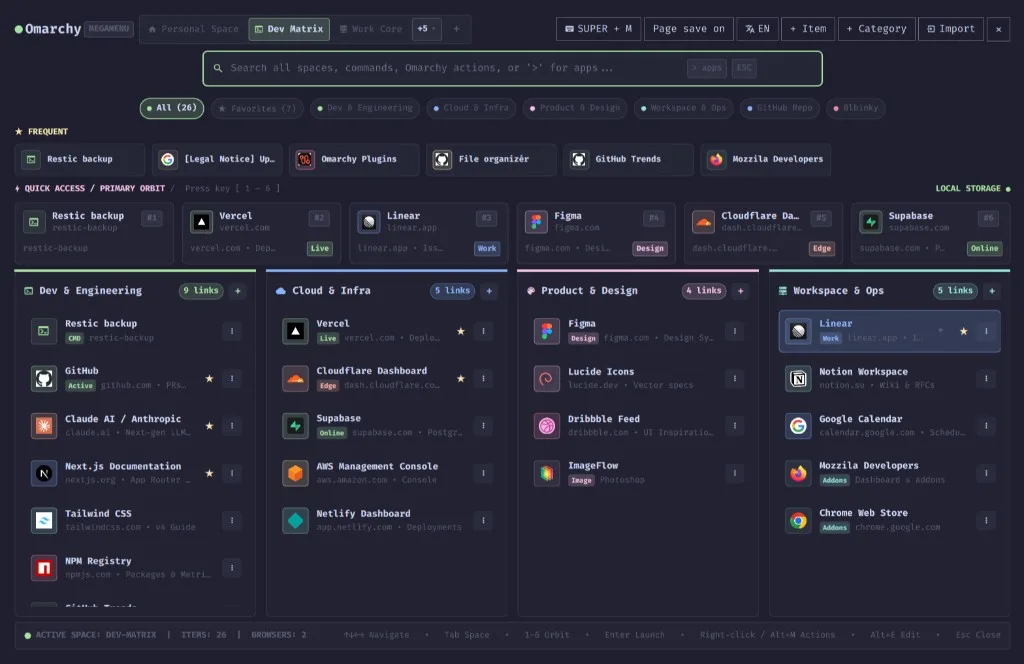
Open it from the Megamenu icon in the bar, or from a terminal:
omarchy-shell shell toggle gruut.megamenuWhat you can keep in it
Section titled “What you can keep in it”- Spaces for separate sets of links, feeds, and apps. Switch with
TabandShift+Tab. - Quick Access Orbit, six pins per space, launched with
1through6. - Columns that are a static list, an RSS or Atom feed, or a GitHub repository.
- Search across spaces, Omarchy actions, and installed applications. A query that starts with
>opens the full actions view. - Shell commands that run in a terminal or in the background.
- Bookmark import from installed browsers, and a browser add-on that saves the tab you have open.
Bookmarks, categories, and commands stay in ~/.local/share/omarchy-megamenu/data.json. The language control in the top bar cycles Auto, EN, and CS.
Install it with one command. Saving the tab you are reading is the step with two parts: the add-on and the local helper.
Source: github.com/Morganczech/omarchy-megamenu. Firefox and Zen: Omarchy Megamenu on Mozilla Add-ons.
Contact
Section titled “Contact”A bug or an idea belongs in GitHub issues. You can also write to megamenu@rovix.eu.